
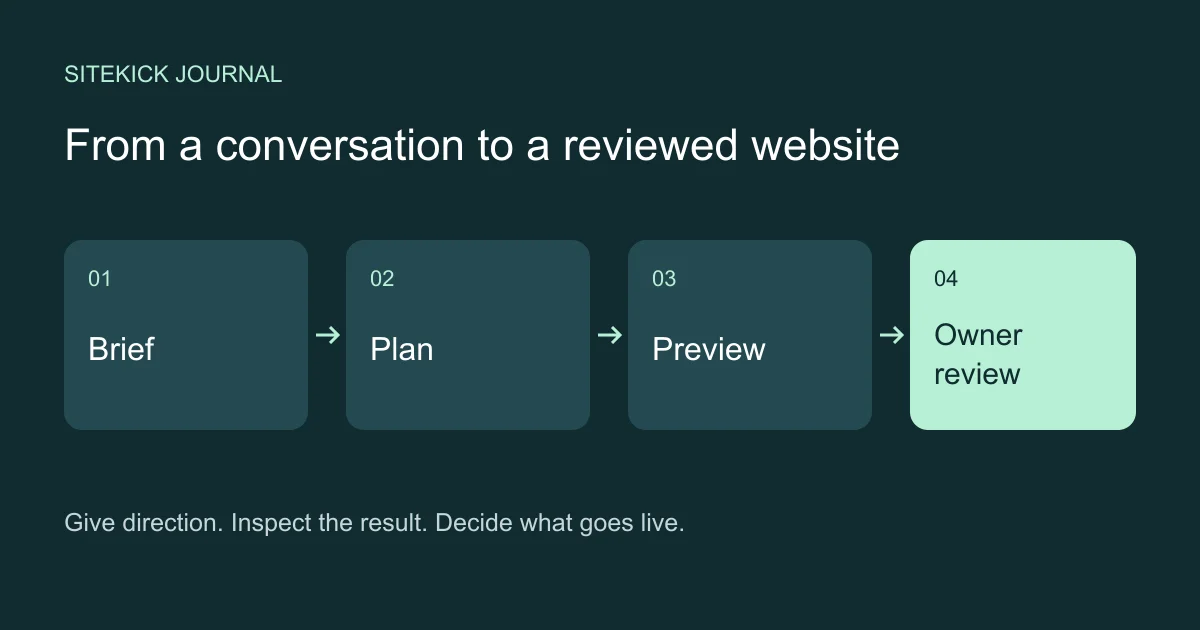
Managing a WordPress website often starts with a navigation problem: find the right menu, locate the page, open the editor and work out which setting controls the result. A conversation-led workflow starts with a different question: what should this website do better?
That shift is useful when it turns a vague intention into specific, reviewable work. “Make our services clearer” can become a plan for page structure, simpler descriptions and a more obvious next step. The owner still supplies the facts and decides what deserves to go live.
Start with a goal and the facts that constrain it
A useful request names the audience, the intended action and the facts the assistant must preserve. For example: “Plan a four-page website for our garden maintenance business. Help homeowners understand our services and request a quote. Use these service descriptions and contact details. Do not invent prices or testimonials.”
The first result should be a plan you can inspect. Check the proposed pages, navigation and calls to action before generating the website. If the plan misunderstands the business, correcting it at this stage is easier than reviewing that misunderstanding across every page.
For an update, narrow the request: “Refine the service-page copy for first-time customers. Keep the approved prices, service area and contact information.” Supply the current facts rather than expecting the assistant to infer them from an old conversation.
What MCP contributes
Model Context Protocol, or MCP, gives a compatible assistant a defined interface to tools and their results. A website connection can expose actions such as inspecting an authorized site, reading a saved project or checking a generation job. The protocol supplies the connection; the CMS determines the permissions and operations behind it.
An assistant cannot infer access to every WordPress plugin from the presence of MCP. Asking “Which articles lost search traffic?” needs a connected source of search data and a defined comparison period. Asking “Why is the homepage slow?” needs actual performance measurements. Those are useful questions, but an MCP connection alone is not evidence that either data source is available.
Sitekick’s conversation-led CMS workflow is designed around authorized sites, editable project plans, explicit generation and reviewed releases. With an enabled connection, the assistant must stay within the selected site’s capabilities and the owner’s permissions. A connection is not a grant of network or server administrator access.
Turn the conversation into distinct decisions
Keep planning, spending generation credits and publication separate. Useful instructions include “Show me the saved plan” and “Show me the generation estimate before starting.” An estimate provides context for the chosen revision; it should not be read as an unlimited authorization or a promise of an exact final charge.
Once generation finishes, inspect the preview. Read every factual statement, open the navigation links, check the contact information and inspect the mobile layout. A convincing paragraph can still contain the wrong service area. A good-looking button can still lead to the wrong destination.
In Sitekick’s release workflow, publication requires the owner’s review in an actual CMS browser session. Connecting an assistant, consenting to access or confirming a tool call does not replace approval of the exact release. If the work changes, review the result that will actually be published.
Keep manual editing in the workflow
Conversation is useful for expressing intent across a website. Direct editing is useful for a precise change you already understand. There is no need to describe a small visual adjustment repeatedly when the CMS editor lets you make it directly.
Sitekick CMS combines AI-assisted creation with a visual editor and WordPress content tools. Supported WordPress and Elementor editing paths provide deeper control. For managed release content, follow the CMS revision and review controls rather than assuming an advanced editor can overwrite a sealed release safely.
The useful combination is a clear brief, a reviewed result and the ability to make a specific adjustment yourself. “Conversational” should describe an additional way to work, not a requirement to put every action into a chat message.
Know what recovery means
Ask what happens if an operation stops responding. Before repeating an uncertain generation or publication request, inspect its status. A missing response is not proof that nothing happened. Preserve the original request identity when the CMS directs recovery instead of starting duplicate work.
Sitekick’s release workflow includes browser-reviewed rollback to an eligible release. Its scope is website presentation. Orders, bookings, submissions and other live business records have their own authority and recovery requirements. Do not treat a release rollback as a complete database restore or a guarantee that every external effect can be undone.
Before a significant update, identify the eligible recovery target, confirm who can approve it and keep business-critical checks in the review. Recovery is a capability to verify for the selected website, not a substitute for reading the preview.
A managed service should reduce the assembly work
A custom WordPress MCP setup leaves someone responsible for the connection, permissions, hosting and maintenance. A managed CMS can bring website creation, hosting and ongoing content work into one service. Evaluate the actual workflow and the tools enabled for your account rather than choosing by the number of integrations in a demo.
Explore building and managing WordPress through conversation, or compare Sitekick CMS plans to follow the existing subscription and onboarding route. Conversation and MCP access depend on the supported connection enabled for your account. For the broader editing experience, see Sitekick CMS.
The goal is practical: explain what you want the website to accomplish, inspect the proposed work and keep control of the decision to publish.